
Moderation api changelog
Your Own Face on the Slack Bot
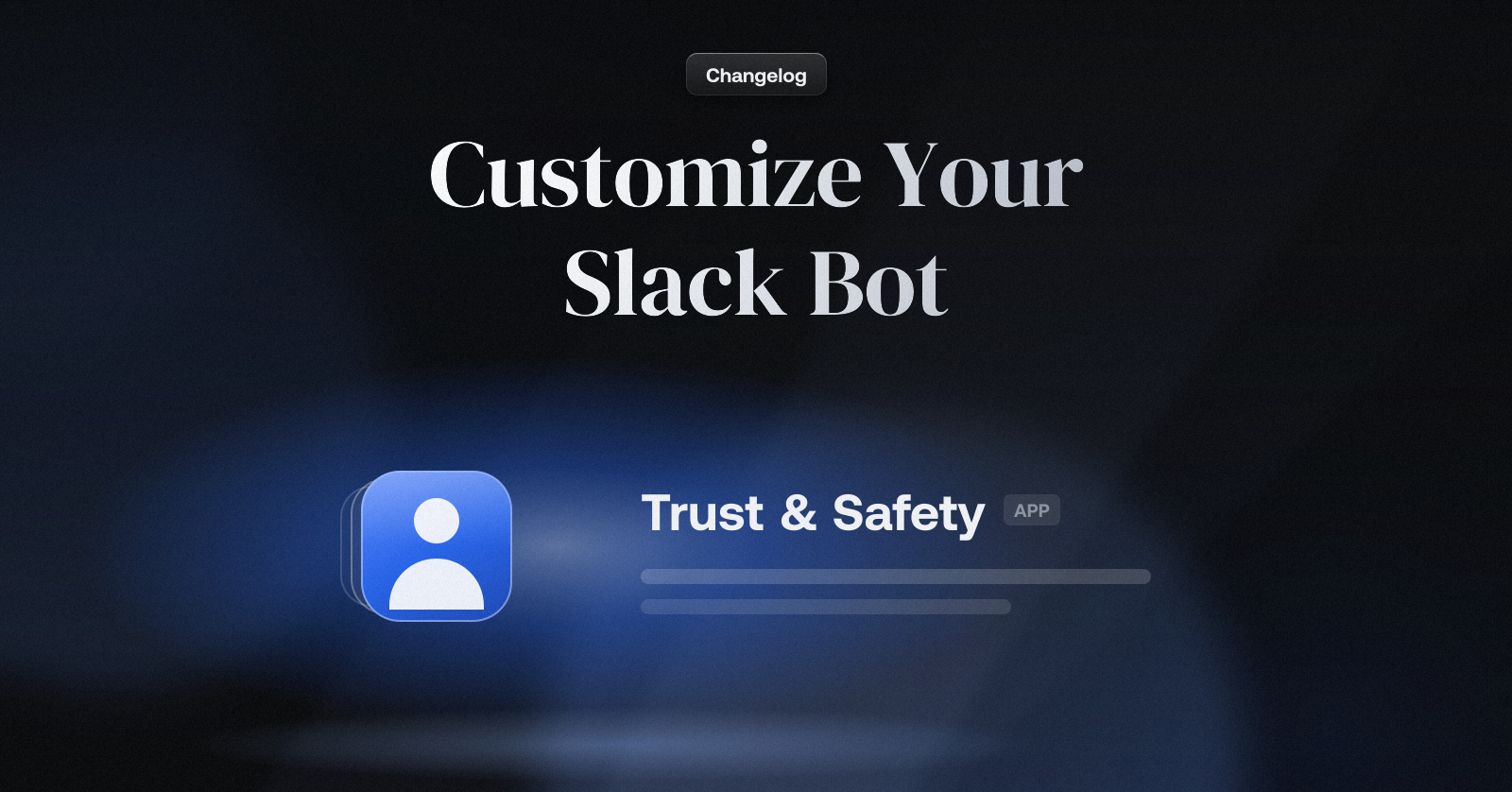
Give the Slack bot your own name and avatar, so moderation notices come from someone on your team rather than from a tool.
Telling someone their message broke the rules is a delicate message to get right, and until now it arrived from "Moderation Bot". The wording was yours; the messenger was ours.
Today, the messenger can be yours too.
How it works
A name and an avatar, per workspace. Set them under Slack → Bot identity. The bot's messages in channels, and its DMs to authors, carry them from the next flagged message on.
Leave it empty for ours. No name means the bot posts as Moderation Bot, exactly as before.
Casebook

When you moderate with AI, two things go wrong. It flags content it should not flag. And it misses content it should flag. Either way you spend more time on manual review, or things slip through.
You can tune prompts and thresholds. But the real problem is that the AI does not learn from your reviews. You allow the same kind of item ten times, and the eleventh one still lands in your inbox.
Today we're introducing Casebook. It remembers every decision you make in the review inbox. When similar content shows up again, it makes the same decision for you.
How it works
Every item gets one of three recommendations: allow, reject, or review. Casebook works on the third one.
Take a marketplace that bans weapons. An airsoft gun listing gets flagged for firearms and lands in review. You allow it. Casebook records that. The next airsoft listing is allowed without you.
You review as usual: every allow and reject in the review inbox becomes a case. Nothing extra to do.
Casebook looks up new content: when an item arrives, it finds the closest cases and checks how you ruled on them.
It is careful on purpose: one example is not enough. Casebook needs a few agreeing cases before it rules on a pattern, and tells you when it needs more.
It sends the rest to you: if the evidence is thin, or past cases disagree, the item goes to review as before.
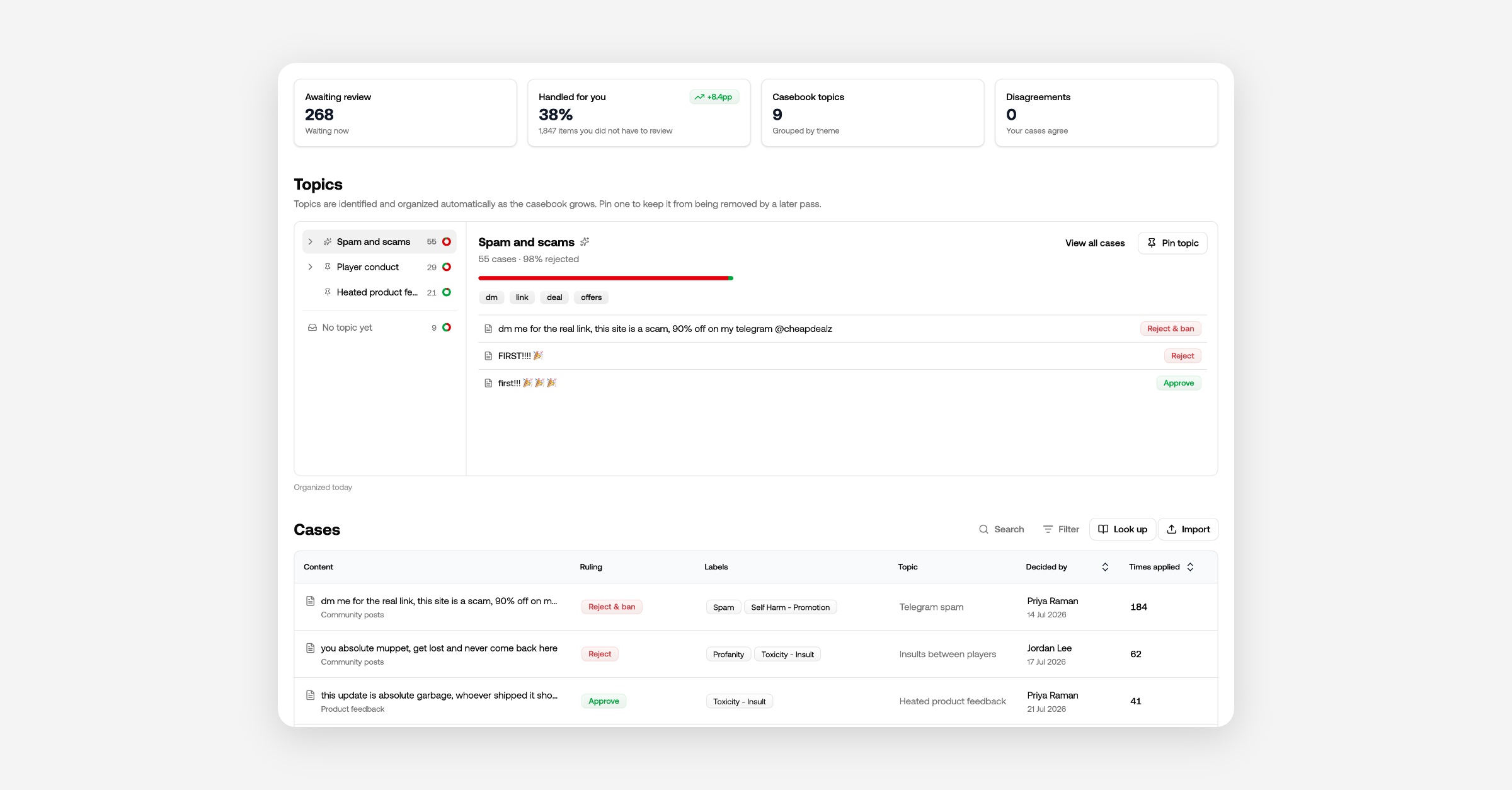
Resolve disagreements
Two reviewers, or one mistake, can leave you with similar content ruled both ways. Casebook will not rule on that pattern until you settle it. Open the disagreement and pick one:
Allow all of them.
Reject all of them.
Keep both rulings, when the cases really are different kinds of content.
Topics
Every day, Casebook sorts your cases into topics on its own. Open a topic like "Replica firearms" and you see how your team handles that kind of content. There is nothing to set up.
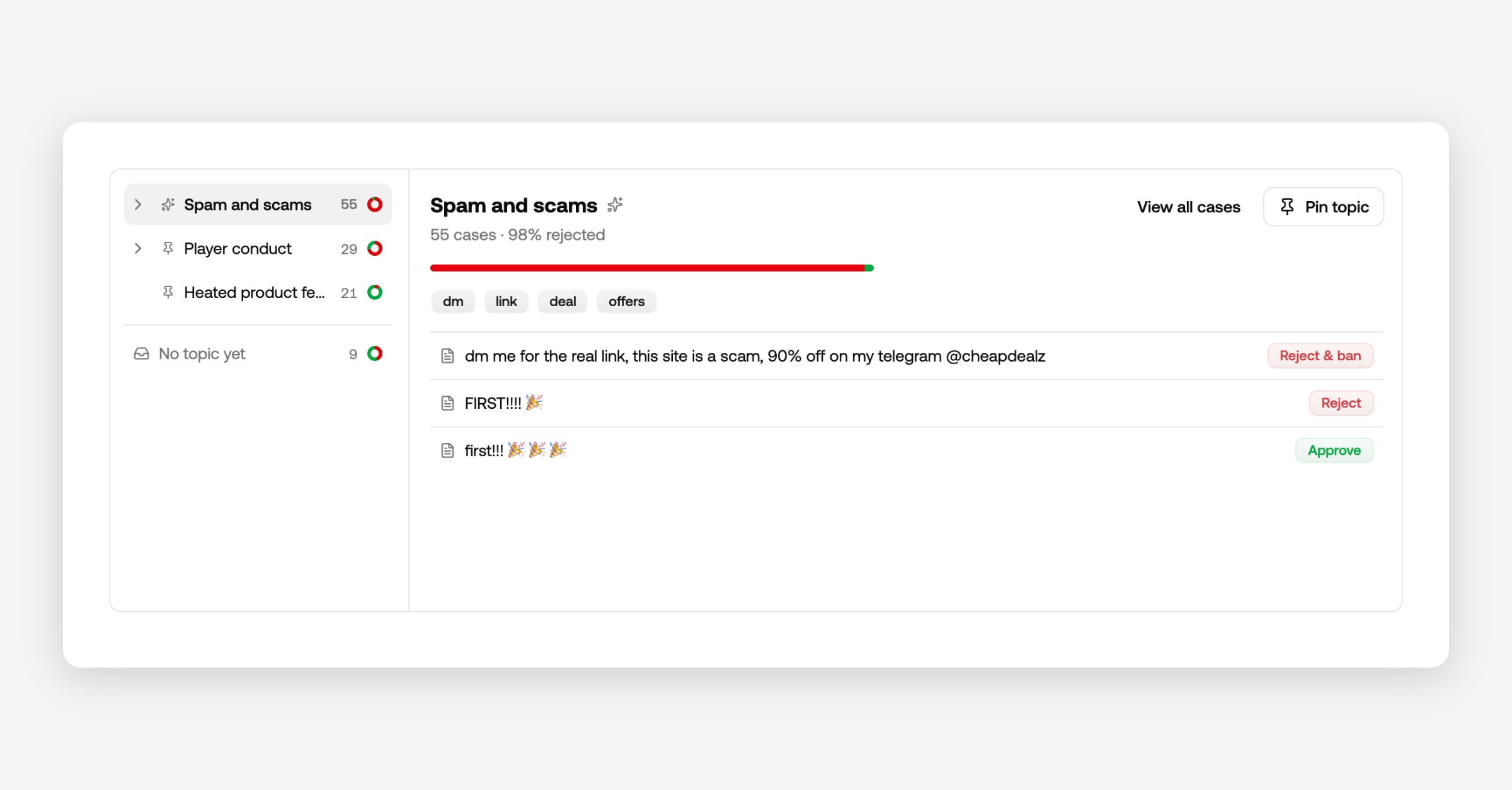
Pin a topic to keep it. A pinned topic keeps its name and is never reorganized. Then go to your rules, pick Casebook → Topic, and decide what happens to it: always review it, always reject it, whatever fits your platform.
Turn it on
Your reviews already go into Casebook. To let Casebook act on them, open your channel's rules and enable the Casebook lookup row. Then test it in the playground: an item flagged for firearms, allowed by Casebook, final recommendation allow.
New channels on Growth and above have this on from the start. Moderation results carry the Casebook verdict, confidence, and topic, so you can see why an item was allowed or rejected.
Casebook in the review inbox
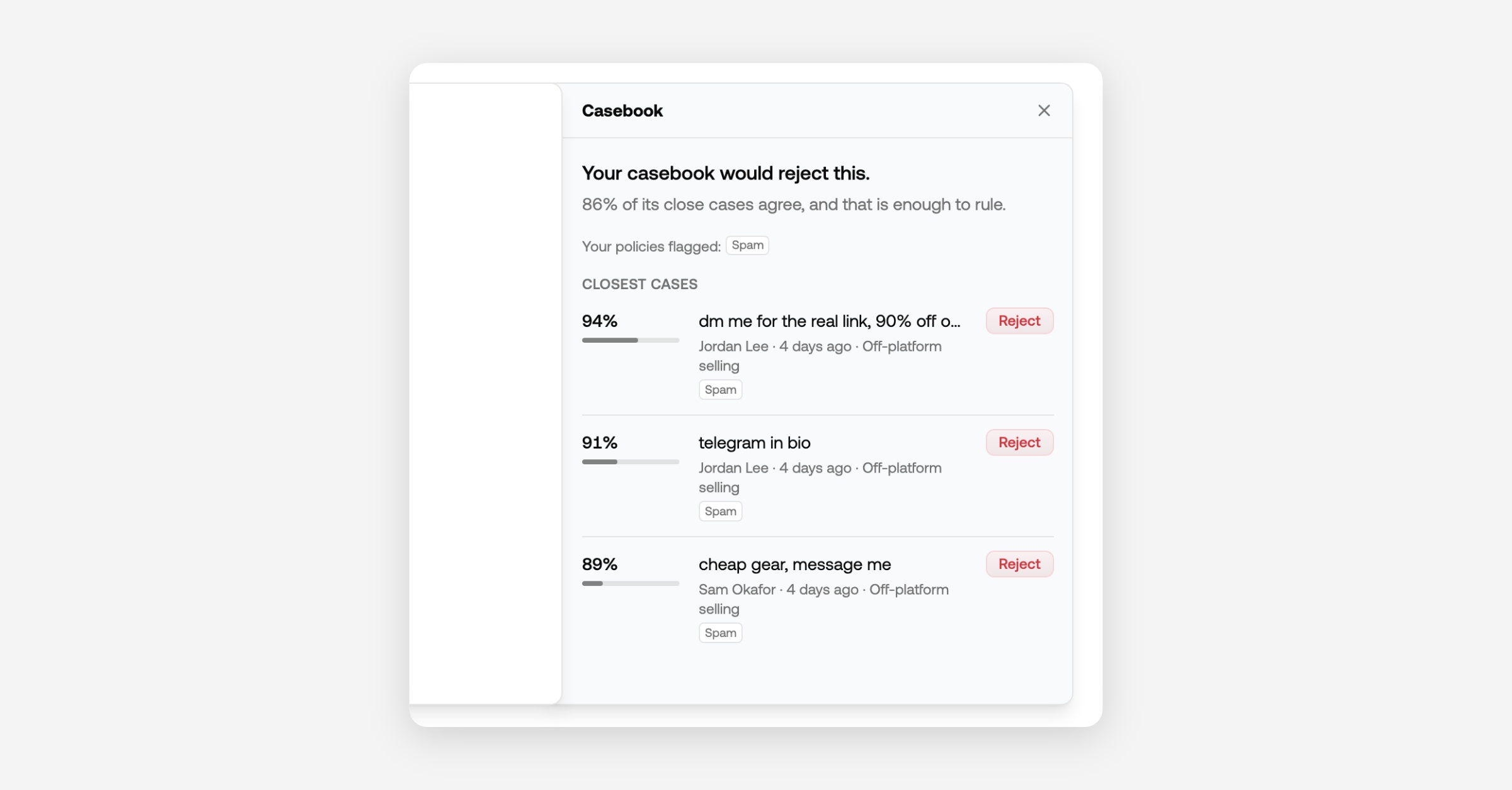
Open an item and pull the Casebook bookmark at the right edge. It shows the most similar cases and how you ruled on them, so you decide with your history in front of you.
Start with what you already have
Press Import on the Casebook tab to replay the last 90 days of review decisions, or upload a CSV from another tool. It runs in the background, and cases Casebook already holds are skipped.
Flag Rate Alerts

Get an email when a project starts flagging at twice its usual rate, with a link straight to the items behind it.
A spike in flagged content is the first sign of a raid, a spam run or a rule that suddenly matches too much. The overview has shown a warning for it, but only to someone looking at the overview.
Today, that warning also arrives by email.
How it works
Same signal as the dashboard. When a project flags at twice its 30-day rate over the last two days, on at least 50 flagged items, the team is alerted. The email shows the two rates and the item count.
One email, not a stream. A project is alerted at most once a day, however long the spike lasts.
Straight to the items. The button in the email, and the one on the overview warning, open your inbox on the flagged items of the spike window. Save it as a view if you want to keep watching.
Yours to switch off. Alerts are on for everyone by default. Turn them off under Account → Notifications; the unsubscribe link in the email does the same.
Slack Integration: Moderate Your Workspace from the Dashboard

Connect a Slack workspace as a channel, pick what happens to flagged messages, and review everything in your queue.
Slack workspaces can now be connected as first-class channels, configured from the dashboard like any other integration.
Connect a workspace
Create a channel and pick Slack in the integration chooser, then click Install — that's the whole setup. The workspace links to the channel automatically, the review-queue webhook is provisioned for you, and if a workspace admin does the install, message removal works out of the box.
Configure from the dashboard
The channel's settings page gets a Slack settings card once connected:
Flagged message action — by default the bot follows each message's recommended action:
rejected messages are removed,
review-worthy ones get flagged in their thread,
allowed ones stay untouched.
When flagged, you can also choose to have the bot:
Reply in thread
DM the author
Custom messages — write your own thread reply and DM text, with
{channel},{message}and{user}template variables.Scope — the bot moderates exactly the channels it's in. Pick channels in the dashboard and the bot joins or leaves the channels. Also, choose whether new public channels are joined automatically.
Review queue round-trip
Flagged Slack messages land in your review queue like any other content. Reject an item in the queue and the bot deletes the message in Slack.
Slack users
Your Slack users shows up in the user dashboard inside Moderation API.
Here you can see their flags, and auto assigned trust levels.
If you block or suspend a user here, it will also prevent them from posting inside Slack.
URL Risk Rule Conditions

Build rules on individual URL Risk signals, link shorteners, redirect chains, reported URLs, brand impersonation, and domain age.
URL Risk scores every link in a message, but until now rules could only act on the
overall score. The individual signals behind that score are now available as rule
conditions, the same way Unicode Spoofing exposes its per-signal flags.
How it works
In the rule builder, pick the URL Risk policy and condition on any of its signals:
Link shortener — the message contains a shortened URL.
Redirect count — the longest redirect chain behind any URL. For example, reject
when it is greater than 3.Reported URL — a URL is on a threat intelligence blocklist.
Brand impersonation — a URL imitates a known brand's domain.
Suspicious characters — a URL uses look-alike or unusual characters.
Domain age (days) — the youngest domain in the message. Catch freshly registered
phishing domains with a "less than 30" condition.
Signals cover every URL in the message, and URLs on your allowlist are ignored. The AI
rule assistant knows the new fields too, so "reject links with more than 3 redirects"
writes the rule for you.
Metadata Filters

Narrow any review queue to your own metadata.
You already send metadata with every item; a campaign id, a brand, a tenant, whatever your product needs. Until now the queue could show those fields as columns but could not filter on them, so finding one room’s flagged content meant scrolling for it.
Today, we're adding metadata filters to every review queue.
How it works
Pick Metadata in the filter menu, choose one of the fields seen on your recent
items, and type the value you want.Add several values for one field to see any of them, or filter on several fields at
once to narrow further.Save the result as a view, and the whole team gets a queue scoped to that campaign or
brand.The AI filter understands metadata too: "flagged content from campaign CF875N6". Name a
field without a value and it leaves the chip ready for you to fill in.
Failing Webhooks Turn Themselves Off

A webhook that fails 20 deliveries in a row is disabled and your team gets an email.
A broken webhook endpoint used to fail in silence. We retried each delivery five
times, wrote the failure to the event log, and then moved on to the next event
and did the same again.
20 strikes, then we stop
Each delivery that uses up all five of its retries counts against the endpoint. A
single successful delivery resets the count to zero, so a slow minute or a
restart costs you nothing. Twenty failed deliveries in a row is different — that
is an endpoint that is not coming back on its own, so we stop sending to it.
The webhook then shows as Disabled on the webhooks page, with the reason, and
new events are not delivered to it.
Your team hears about it
Everyone in the organization with an owner, admin or developer role
gets an email the moment it happens. It names the endpoint, shows the last error
we saw — the status code or the timeout — and links straight to the webhook.
Moderators are left out of it: they cannot fix an endpoint, and it is not their
alert to carry.
Turning it back on
Fix the endpoint, then open Configure → Webhooks and choose Enable on the
disabled row. Deliveries resume immediately and the counter starts again from
zero.
Events that fired while the webhook was off are not queued up and replayed at
you. What you can do is replay them one by one from the event log, so you choose
what is still worth delivering rather than being handed a backlog.
The New Review Queue
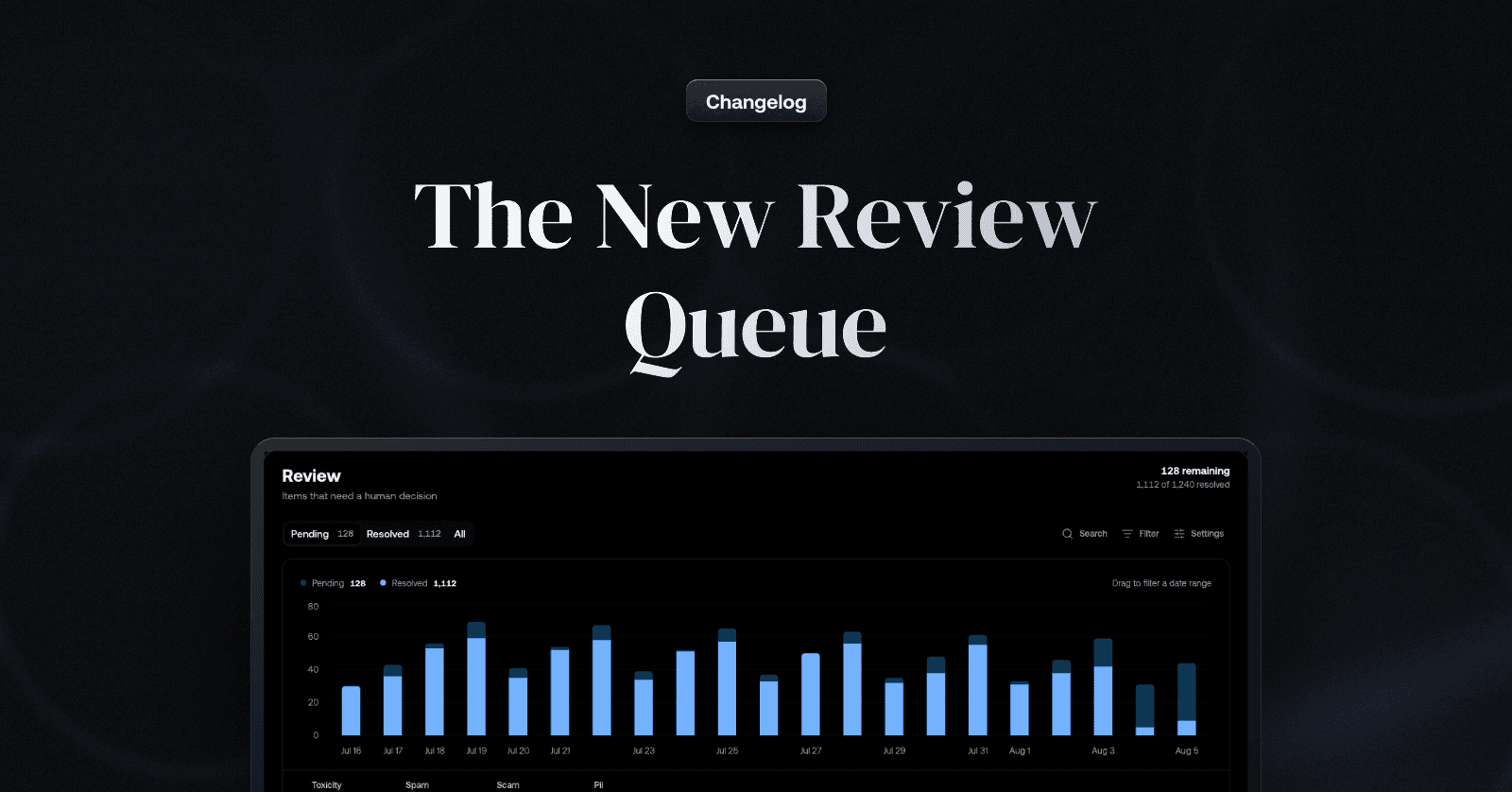
One inbox, filters you can see and save, and views shaped to how your team works
Review queues grew a lot of configuration over the past year, and many of you told us
the same thing: getting from "I opened the dashboard" to "I'm making decisions" took too many steps. Several sibling queues, a filter dialog, a chart before the content - the work was buried under its own tooling.
We've spent the past weeks rebuilding the whole surface around one question: how quickly can a moderator find the items that need them, decide, and move on?
Start in one place
New projects start with a single Review inbox: every item the system asked a human
to look at, across all channels. You no longer have to check several queues to be sure
nothing slipped through - and the sidebar shows how many items are waiting, so you know the size of the day before you click. Resolving an item in the inbox resolves it
everywhere.
Always know what you're looking at
The filter dialog is gone. Filters now live in a filter bar on every queue: each
active filter is a visible chip, so the question "why am I seeing these items?" always
has an answer at the top of the page. Adjust a chip and the table follows; when your
filters differ from the view's saved definition, the bar tells you - keep the change for
yourself, or save it as the new default for your whole team.
Get to the items that matter in seconds
Narrowing thousands of pending items down to the ones that need you is now a sentence, not a setup task: with AI filters.
Describe what you want to review in plain language: "flagged video from new accounts this week" - and the AI builds the filter for you, ready to refine like any other. New properties close gaps you've asked for:
Text search — when a user reports a message, find it by typing what you remember
of it. Each search term becomes a chip, and adding more terms narrows further.Media type — review text, images, video, and audio separately when they need
different judgement.Author trust level — put reviewer attention on content from the accounts most
likely to need it.Content ID — pull up every moderation request for one piece of content when a
user reports it or a decision is appealed.Date, by dragging — drag across the activity chart to zoom the queue into a date
range, so investigating a spike starts where you saw it.
Views shaped to each team
Any slice of the inbox can be saved as a view and shared: a fraud team's view can
lead with author and metadata columns, a marketplace team's with specific channels and labels. Each view chooses its own columns, built-in fields plus any metadata keys found on your items, and every row always carries its channel and author, so the common case needs no configuration at all.
Views make an investigation reusable: once you've narrowed down to a pattern worth watching, save it, and your teammates start tomorrow from the same place.
Decisions up front - and undoable
Queue pages now lead with the content: Pending / Resolved / All tabs, remaining and
resolved totals, and the table right below. Bulk actions, keyboard shortcuts, and item detail all work as before, with one addition: selecting already-resolved items flips
the action bar to Unresolve, so a batch resolved too eagerly comes back in one step.
Existing projects keep their queues exactly as configured. Every queue you already have picks up the filter bar, tabs, and new filters automatically. The single Review inbox applies to new projects.
If your project has accumulated queues over time, this is a good moment to tidy up:
most setups get simpler as one inbox for daily review plus a handful of saved views for routing and auditing. And if you're unsure how to map your current queues onto views, or want a second opinion on your review workflow, reach out through support and we'll gladly help you set it up.